Getting Started
Quick Connection Information
To connect to UO:Renaissance, configure your client (Razor, ClassicUO, or UOR Launcher) with the following server settings:
| Server Host | play.uorenn.com |
|---|---|
| Port | 2593 |
| Account Creation | Automatic — simply enter your desired Account Name and Password at the desktop login screen (or sign in via Discord on the Web Client) |
| Accounts Allowed | 3 accounts per player |
| Client Support | UO:R Web Client (Zero-install browser play), Classic Client with Razor, ClassicUO, CrossOver / Wine (Mac & Linux), and Mobile UO (iOS & Android) |
Tip: Accounts are created automatically on your first login attempt. Make sure to remember your password, as it will be tied to that account name permanently.
Essential: Account Registration & Discord Linking
⚠ CRITICAL ACCOUNT RECOVERY WARNING IF YOU DO NOT REGISTER YOUR PERSONAL EMAIL ADDRESS, STAFF WILL BE UNABLE TO RECOVER YOUR ACCOUNT IF YOU EVER LOSE OR FORGET YOUR USERNAME OR PASSWORD.
Registering your account and linking it to Discord is 100% FREE and highly recommended for every player. It unlocks access to additional community channels, exclusive information, guides, and shard content, while ensuring your game progress can always be recovered.
Step-by-Step Registration & Linking Guide
- Link Forum & Discord Accounts:
- Create an account on our official forums at uorenn.com/forum.
- During registration, link your Discord account to your forum profile.
- Obtain Your Discord ID:
- Join our Official Discord Server.
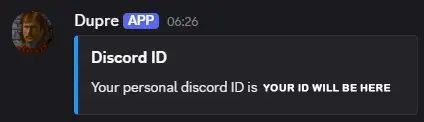
- In the Discord chat, type the command:
!discordid
- The bot (Dupre) will send you a direct message (PM) containing your unique Discord ID.
- *(Do not share this confidential code with anyone!)*
- Open the In-Game Profile Menu:
- Log into any character on your account in game and type:
[profile
- This opens your interactive character and account management window.
- Log into any character on your account in game and type:
- Enter Your Login Password, Discord ID & Recovery Email:
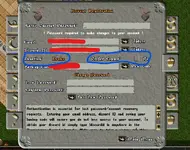
- Click the third tab on the left of the profile gump.
- Enter your account login password, input your Discord ID, and add your personal email address for account recovery. Note your backup recovery code.
- Click Update to save your settings.
- Supporter Tier & Preferences (Optional):
- Upon successful registration, your account will be upgraded to Drake Tier.
- If you are a Dragon or Wyrm supporter, tick "Prefer Copper" for the account you want it delivered to.
- *(Caution: DO NOT click it on two accounts or you will not receive any!)*
- Finalize Registration:
- Once completed, contact Peace via Discord with your details to complete your registration and unlock full community access.
Official Discussion & Support: For questions, troubleshooting, or further registration help, visit the forum guide: Viewing & Posting in Additional Channels by Peace.
Step 1: Client Options & Installation
Web Client
Prefer to jump straight into Britannia on a laptop or work break without installing desktop software? You can now play UO:Renaissance directly inside your web browser:
- Play Online: web.uorenn.com
- Zero Installation: Runs ClassicUO in your browser using WebAssembly with automated background asset updates.
- Discord Login: Authentication is handled entirely through Discord — your character profile, hotkeys, and macros automatically sync to the cloud.
- Built-in Assistant: Includes custom tooltips, macro tools, and an option to import your desktop ClassicUO hotkeys.
- Requirements: Chromium-based browser (Chrome, Edge, Brave, Opera) with Hardware Acceleration enabled, plus ~5–10 GB free disk space.
- Important: Do not play in Incognito / Private mode, as private sessions wipe cached files and force a full re-download each session.
For performance flags, GPU configuration, and troubleshooting, read the full UO:R Web Client Guide.
Desktop Client Installation
You can download the full installer and client packages directly from the official website:
- UO:Renaissance Full Game Client & Launcher — Includes the complete game files, art, sound, and connection utilities.
- Razor Assistant — The recommended tool for macros, hotkeys, screen resolution, and targeting.
- ClassicUO Client — Modern, high-framerate open-source client compatible with modern operating systems and high-DPI displays.
For a comprehensive guide on configuring your client options and Razor, see Razor & Client Setup.
Mobile UO
Want to play on your mobile phone or tablet? You have two options:
- Browser Play (Instant): Visit web.uorenn.com in your mobile browser with Discord login.
- Native Mobile App (Mobile UO): Play using the dedicated Mobile UO (MandoUO) client on iOS and Android with touch controls and built-in UO:Renaissance downloader.
- For installation links, music setup, and forum discussion, see the Mobile UO Guide.
Step 2: Character Creation
When launching the game and logging into Britannia for the first time, you will be prompted to create your first character.
Attribute Points (Stats)
You are given 80 total attribute points to allocate across your three core stats:
- Strength (STR): Dictates your Maximum Hit Points (HP) and carrying capacity. Highly recommended to start with high Strength (e.g., 45–50) for survivability.
- Dexterity (DEX): Dictates your Stamina, weapon swing speed, and bandage application speed.
- Intelligence (INT): Dictates your Maximum Mana pool for casting spells.
The stat cap on UO:Renaissance is 225 total points (with a maximum of 100 in any single attribute before buffs).
Starting Skills
You can distribute 100 skill points across three chosen skills. Because some skills are much harder to train than others, choosing the right starting skills saves enormous time:
- Recommended to Start High (50 / 50 or 50 / 49 / 1):
- Magery — Reagents and spellbooks cost gold; starting with 50 Magery gives you an immediate spellcasting foundation.
- Resisting Spells (Magic Resist) — Very slow to train manually in the wild; starting with 50 Resist is widely recommended.
- Healing — Vital for any warrior or adventurer relying on bandages.
- Inscribe / Alchemy / Blacksmithy — Resource-intensive crafting skills benefit greatly from 50 starting points.
- Skills to NOT Pick at Creation:
- Weapon skills (Swordsmanship, Fencing, Mace Fighting), Tactics, Anatomy, and Hiding can easily be trained from town NPCs up to ~30.0 for a few coins of gold!
Recommended Beginner Templates
| Archetype | Starting Skills | Description & Role |
|---|---|---|
| The Dexxer / Warrior | 50 Healing, 50 Resisting Spells | Tough, self-reliant melee fighter. Buy your weapon skill and Tactics from town guards/trainers to 30 immediately. |
| The Mage / Adventurer | 50 Magery, 50 Resisting Spells | Versatile spellcaster capable of high burst damage, travel via Mark/Recall, and gate spells. |
| The Bard / Provoker | 50 Musicianship, 50 Provocation | Highly effective PvM money-maker. Uses monsters' strength against each other with no reagent or weapon costs. |
Step 3: Starting City & The Young Player Program
When choosing your starting town, new players are strongly encouraged to select Ocllo.
The Island of Ocllo (Newbie)
Ocllo is Britannia's official **Young Player Haven**. It contains every major merchant, trainer, bank, forge, and a dungeon specially tailored for beginners to hunt skeletons, zombies, and orcs without fear of outside interference.
Young Player Status
New characters on UO:Renaissance are automatically granted [Young] status:
- Renouncing Young Status: You can voluntarily give up Young status at any time by typing:
[young
- Automatic Graduation: Young status automatically expires after 40 hours of gameplay or when your character reaches 450 total skill points.
For full details, visit the Young Player System guide.
Step 4: NPC Skill Training (Instant Boost to 30.0)
Do not start training skills from 0! Town NPCs in Britannia can train your skills up to roughly 30.0 immediately in exchange for gold coins:
- Approach an NPC appropriate to the skill (e.g., a Guard or Fighter for Swordsmanship/Tactics, a Mage for Magery/Eval, a Healer for Anatomy/Healing).
- Say:
[NPC Name] train(e.g., "John train") to see what they can teach you. - Say:
[NPC Name] train [skill](e.g., "John train swordsmanship"). - The NPC will state the cost (usually around 200–300 gold coins).
- Drag and drop the exact gold amount onto the NPC to receive your instant skill gain!
A full directory of trainers across all towns can be found in Starting Towns.
Step 5: Essential In-Game Commands
Here are several commands every new player should know:
>where— Displays your current world coordinates and map location.[young— Check your remaining Young status hours or renounce status.[help— Access the in-game help menu and staff support page.bank— Say near any town banker to open your personal bank box (safe storage).guards— Calls the town guards if you are attacked by criminals inside town protection.
Next Guides to Explore
- UO:R Web Client Guide — Comprehensive guide to browser play, Discord login, GPU optimization, and troubleshooting.
- Mobile UO Guide — Guide to connecting via mobile devices (iOS & Android), music files, and settings.
- Razor & Client Setup — Optimize screen size, setup macros, and configure hotkeys.
- Starting Towns — Explore the cities, facilities, and wilderness of Britannia.
- Young Player System — Complete rules, benefits, and haven dungeons.
- Renaissance FAQ — Frequently asked questions about mechanics, rules, and shard features.
- Skills — Comprehensive guide to training all 49 skills.